
Introduction
With the rise of Kubernetes, managing applications and its dependencies become a thing, to help users and developers to handle these dependencies and components and keep the relationship on each of them is when the package management comes to the table.
While there are several packaging system like the CNAB, Operators or Helm, there is another player on the scenario, Acorn, designed with the application needs on the core of the concept, letting Kubernetes focus on providing infrastructure to run the workloads.
As Acorn is application and cloud-native focused project, it provides higher level of specificity allowing the most complex applications to be described and run.
This article describes Acorn, benefits and a hands-on entry point to the project.
Why do I need a package manager?
Package managers are essential tools for managing software dependencies in a project.
Developers describe the application which ends up with a bunch of yaml files of objects to deploy like deployments, DaemonSets or other controllers, along with required services, volumes and many more, each of them may have their libraries, components and dependencies, on a single dev or laboratory kubernetes cluster, it can be easily addressed as the user knows the requirements and can install them manually.
Sooner than later, the application will go through a workload pipeline to be deployed not only on a laboratory but a several production clusters, regions and/or zones, along with many other applications managing the dependencies, libraries and requirements manually become simply impossible to handle.
Here’s is where a package manager appears to be the way to go!
Package managers allow users and developers to describe every single application component as a part of an entire application so when
Comparison between Acorn and Helm
Acorn and Helm are both package managers for Kubernetes, designed to help manage applications and their dependencies, but they have some key differences.
Acorn is designed more specifically for cloud-native applications and is built with Kubernetes’ infrastructure in mind. It focuses more on the application itself, allowing users to describe complex applications easily. It uses a programming language called Python to define packages. Acorn also provides customization options, giving users more control over the installation process of their packages.
Helm, on the other hand, is more of a general-purpose Kubernetes package manager. It is built on top of Kubernetes’ package management tool called “Tiller”, and it uses a templating language called YAML to define packages. Helm also provides users with a more streamlined installation experience, guided by pre-defined templates called “charts”.
In summary, Acorn is designed to be more application-focused, while Helm is more infrastructure-focused. Acorn provides more customization options and uses Python to define packages, while Helm provides users with pre-defined templates and uses YAML to define packages.
Acorn
Helm
- Application focused design
- Application code and dependencies are built as container images stored in the registry
- While there is no built-in template system in Acorn, as everything is within the container images configurations variations are applied through command-line arguments during deployments or environment variables
- Acorn is a new player in Kubernetes package management, it is gaining traction and adoption
- Designed with k8s structure in mind
- Helm Charts contains a collection of kubernetes manifests and configuration objects stored into chart repository
- Templates in helm allows application with configuration and variables changes to be deployed removing the need of multiple Charts to cover similar application with little changes
- Helm has been around the community since quite long ago, it is widely spreaded accross the community and many enterprise-level applications provide their software using Helm charts
Hands-on Acorn!
Let’s jump into Acorn!
Installing Acorn
Acorn cli can be used to deploy Acorn on a Kubernetes cluster, for this article I will use kind and a macbook as laptop
Install the cli and check it runs successfully:
> brew install acorn-io/cli/acorn
==> Installing acorn from acorn-io/cli
[...]

> acorn version
acorn version v0.7.1+df5bf694
Alright, next step is to deploy on a kubernetes cluster
>acorn install ✔ Running Pre-install Checks ✔ Installing ClusterRoles ✔ Installing APIServer and Controller (image ghcr.io/acorn-io/acorn:v0.7.1) ✔ Waiting for controller deployment to be available ✔ Waiting for API server deployment to be available ✔ Waiting for registry server deployment to be available ✔ Installation done
Pretty straightforward, right?
Acorn installation creates a bunch of CustomResourceDefinitions and the associated namespeces, deploys and services needed to work with Acorn.
Acorn file example
Acorn is designed with application in the center, which makes Acorn very flexible option to structure the application, managing requirements and deploy on Kubernetes, it uses the Acornfile to define the application.
Acornfiles can be as complex as your application need, but it can be start from a very basic boilerplate then add as many arguments as you want.
Let’s take a look on this example
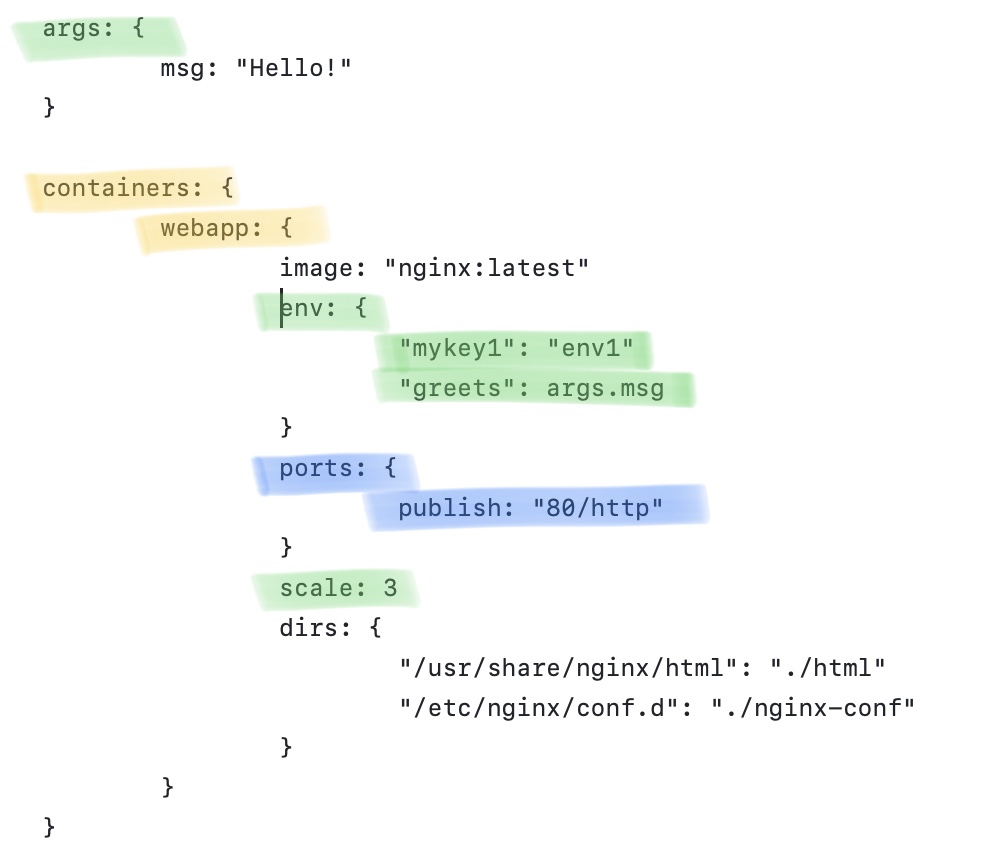
- args: user-defined customization parameters which can be retrieved with something like ‘args.msg’ as shown above
- containers: the definition of the application containers.
- image: the image and tag tandem to retrieve from the image registry
- ports: any required port to expose on the container
- scale: the number of desired replicas
- env: any customized environment variable
- dirs: here it comes the relation of the required volumes and the mapped container directory
Expanded Acorn configurations and structure can be found in the Acorn docs
Building applications and images
Acorn apps are built based on the Acornfile as shown in the above example, let’s build and show how it works.
Within the directory containing the Acornfile
❯ ls -ltr
total 16
-rw-r--r--  1 singularity  staff  273 Jun 29 01:16 Acornfile
❯ acorn run --name myapp1
[+] Building 0.6s (12/12) FINISHED
=> [internal] load build definition from Dockerfile 0.0s
=> => transferring dockerfile: 147B
[...]
[+] Building 0.1s (5/5) FINISHED Take a look at the ingress-controller status
STATUS: ENDPOINTS[] HEALTHY[] UPTODATE[]
STATUS: ENDPOINTS[] HEALTHY[0] UPTODATE[0] [containers: webapp:
STATUS: ENDPOINTS[http://<Pending Ingress> => webapp:80] HEALTHY[3] UPTODATE[3] OK
Application will staty in pending ingress until a successful address is assigned to access the application, at this point, the application is now managed by Acorn cli.
❯ acorn apps
NAME      IMAGE          HEALTHY   UP-TO-DATE   CREATED     ENDPOINTS                                                        MESSAGE
myapp1    aba6722a4791   3         3            3m15s ago   http://webapp-myapp1-a2350cf1.q8ikiq.oss-acorn.io => webapp:80   OK
It takes a while until the assigned endpoint is assigned, you can also see the service and the port linked.
Application is ready and accesible.

Application management with Acorn
As any other k8s application manager, an acorn-based application can be managed through the cli, since the moment of building the app, the lifecycle can be managed through Acorn
Basic Acorn operations
Application can be managed using the start/stop options with the cli
❯ acorn stop myapp1
myapp1

❯ kc get deployment.apps -n myapp1-1ba97eb0-ea5
NAME                     READY   UP-TO-DATE   AVAILABLE   AGE
deployment.apps/webapp   0/0     0            0           28m

❯ acorn start myapp1
myapp1

❯ kc get deployments.apps -n myapp1-1ba97eb0-ea5
NAME     READY   UP-TO-DATE   AVAILABLE   AGE
webapp   3/3     3            3           28m
Pretty easy tasks intended to cover the most basic operations with Acorn apps, start-stop as you would do with other package managers
Update
Applications are live components which are updated and modified as the business requirements change.
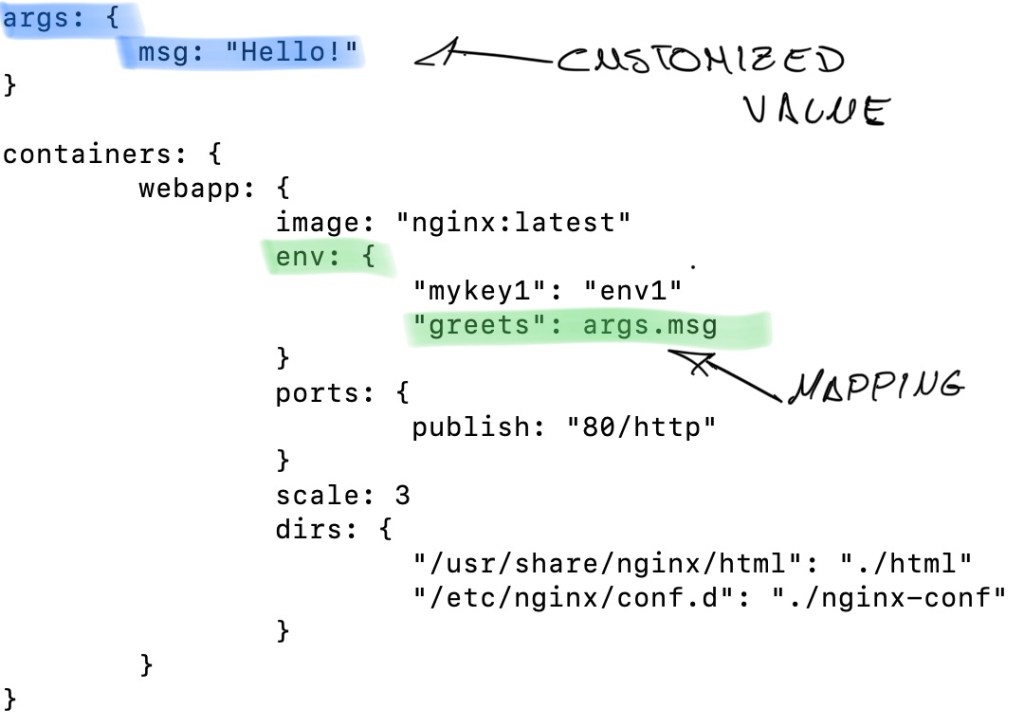
According to the Acornfile, I am using the args block to define customized values for the app, then map this value to a environment variable
As a result
In the application, the spec.containers.env are created to use the above environment variable.
Let’s look at the application
❯ kubectl get deploy/webapp -n myapp1-1ba97eb0-ea5 -o yaml
[...]
    spec:
      containers:
      - env:
        - name: greets
          value: Hello!
[...]
Let’s update the values to simulate a new version of the application.
First of all update the Acornfile, changing the args and env blocks.
args: {
	msg: "Hello! this is an updated parameter"
}

containers: {
	webapp: {
		image: "nginx:latest"
		env: {
			"mykey1": "Updated parameter"
			"greets": args.msg
The Acornfile is now updated with the args.msg{} new message and the mykey1 also updated manually, these changes should be reflected once the application has been updated.
Use the Acorn cli to update the app
❯ acorn update -f Acornfile myapp1
myapp1
[...]
STATUS: ENDPOINTS[http://webapp-myapp1-a2350cf1.q8ikiq.oss-acorn.io => webapp:80] HEALTHY[3] UPTODATE[3] OK |
Conclusion
Acorn serves as a reliable and efficient package manager for Kubernetes. Its integration into the Kubernetes ecosystem has provided users with simpler and intuitive methods of installing and managing dependencies. Acorn’s ability to manage dependencies across a cluster enhances the overall scalability and reliability of Kubernetes applications. As Kubernetes continues to grow and evolve, Acorn’s role as a package manager will become increasingly important. With Acorn, users can confidently manage their Kubernetes applications with ease and efficiency.
 Germán M. Yébenes